

Settle It from Orbit
Can't pick dinner? Build an app that asks a satellite to decide for you
Houston, we have a problem. We can't decide whether we get pizza or sushi for dinner. We thought about voting but we're too lazy to grab a piece of paper. What now?
Well, I have an idea. Let a satellite decide!
In this tutorial we will build a small app that takes two options and picks one using a true random number from space. Because for big stakes, we can't just pick a pseudo-random number generator, right?
The app shows both the decision and the raw seed, so anyone can verify how the choice was made. We'll keep it extremely barebones: a Bun server, the Orbitport SDK, and a React page. Two files total.
Prerequisites
Before starting, make sure we have:
- Bun installed
- Orbitport API credentials — a client ID and client secret. If we don't have them yet, let's follow the Authentication guide to create an account at accounts.spacecomputer.io.
Set up the project
mkdir decision-picker && cd decision-picker
bun add @spacecomputer-io/orbitport-sdk-ts react react-dom @types/react @types/react-dom @types/bun
Create a .env file with our credentials from the Authentication guide:
ORBITPORT_CLIENT_ID=your_client_id
ORBITPORT_CLIENT_SECRET=your_client_secret
Create the app
The whole project is two files: a server that handles the API and serves a React page.
Let's start with Bun. Bun is amazing because it runs typescript natively on its own engine, and even provides an HTTP server. Perfect for a simple project that will decide the fate of my dinner tonight.
server.tsx — API + static server
So here's the plan: our API credentials must stay server-side. We'll use Bun's built-in HTTP server to expose an /api/decide endpoint that calls the Orbitport SDK, and serve our React app as a static bundle.
import { OrbitportSDK } from "@spacecomputer-io/orbitport-sdk-ts";

// we instantiate the SDK here
const sdk = new OrbitportSDK({
  config: {
    clientId: process.env.ORBITPORT_CLIENT_ID,
    clientSecret: process.env.ORBITPORT_CLIENT_SECRET,
  },
});

// and build the actual page we will show: more on that in the next file
const build = await Bun.build({ entrypoints: ["./app.tsx"] });
const appJs = await build.outputs[0]!.text();

// REST service, yey
Bun.serve({
  port: 3000,
  async fetch(req) {
    const url = new URL(req.url);

    if (url.pathname === "/api/decide") {
      // from the initialized cTRNG, we want the seed and the source so we can show on the frontend
      const { data: { data: seed, src: source } } = await sdk.ctrng.random();

      // it's a bit ugly, but this just maps the seed value into either 0 or 1
      const pick = parseInt(seed.slice(0, 4), 16) % 2
      return Response.json({ pick, seed, source });
    }

    if (url.pathname === "/app.js")
      return new Response(appJs, { headers: { "Content-Type": "application/javascript" } });

    return new Response(`<meta charset="UTF-8"><div id="root"></div><script src="/app.js"></script>`, {
      headers: { "Content-Type": "text/html" },
    });
  },
});

console.log("http://localhost:3000");
The SDK handles authentication automatically based on the contents of .env. It requests an OAuth2 token, caches it, and refreshes it when needed.
The seed is a hex string of random bytes from the satellite. We take the first two bytes, convert to a number, and modulo 2 gives us 0 or 1. The frontend maps that to whichever options the user typed in.
env
It goes without saying that you should NOT commit .env! Add it to .gitignore
app.tsx — React frontend
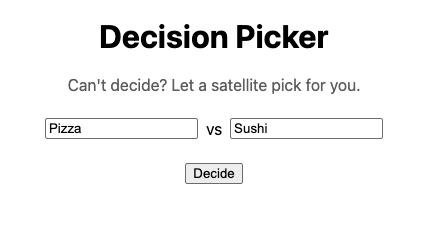
The frontend doesn't know about the SDK, credentials, or satellites. It calls our API endpoint and displays what comes back. It is built by the Bun.build line just above, and served by Bun.serve.
Honestly you can just copy and paste this code, it's mostly HTML and CSS:
import { useState } from "react";
import { createRoot } from "react-dom/client";

function App() {
  const [optionA, setOptionA] = useState("Pizza");
  const [optionB, setOptionB] = useState("Sushi");
  const [result, setResult] = useState<{ pick: number; seed: string; source: string }>();

  async function decide() {
    setResult(await (await fetch("/api/decide")).json());
  }

  return (
    <div style={{ fontFamily: "system-ui", maxWidth: 480, margin: "80px auto", textAlign: "center" }}>
      <h1>Decision Picker</h1>
      <p style={{ color: "#666" }}>Can't decide? Let a satellite pick for you.</p>
      <div style={{ display: "flex", gap: 8, justifyContent: "center", margin: "24px 0" }}>
        <input value={optionA} onChange={e => setOptionA(e.target.value)} />
        <span style={{ alignSelf: "center" }}>vs</span>
        <input value={optionB} onChange={e => setOptionB(e.target.value)} />
      </div>
      <button onClick={decide}>Decide</button>
      {result && (
        <>
          <p style={{ fontSize: 32, fontWeight: "bold" }}>{[optionA, optionB][result.pick]}</p>
          <p style={{ color: "#999", fontSize: 12, wordBreak: "break-all" }}>
            seed: {result.seed} · source: {result.source}
          </p>
        </>
      )}
    </div>
  );
}

createRoot(document.getElementById("root")!).render(<App />);
There's a clean separation: credentials on the server, API route in between. This is the recommended pattern for Orbitport integrations.
Run it
bun run server.tsxLet's open http://localhost:3000, type our two options, and click Decide. We should see one of our options picked, plus the seed that determined it. Just in case any of us grows suspicious of the result 🤨.
What we built
A working app that uses true cosmic randomness. The pattern behind it is the same one every Orbitport integration uses:
- Credentials stay on the server — the
.envvalues never leave our backend. - A server endpoint talks to the SDK — it handles auth, fetches the random seed, and returns JSON.
- The client consumes clean data — it doesn't know or care where the randomness came from.
The Cosmic Wayfinder, Cosmic Cipher, and Cosmic SIWE all layer richer UIs on top of this exact pattern.
Next steps
- Browse the Recipes for more complete examples built on this pattern
- Read How Cosmic Randomness Works to understand what's behind the seed
- Try the KMS guide to add managed signing or encryption to your app